
Introduction
What is Companion for Delivery
Companion for Delivery is a set of tool used to increase STEP user's productivity. It includes Companion for Delivery Excel, CSV and XML files transformation into STEPXML. The ability to upload STEPXML, to monitor import, to test and generate report. It can handle many STEP instances through Maven profiles.
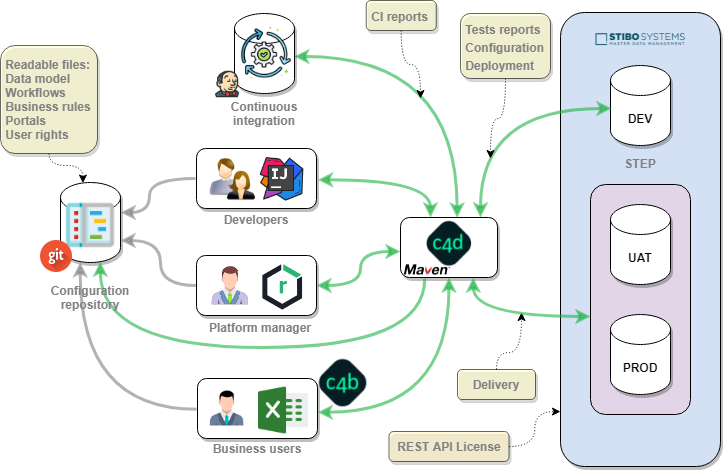
Companion for Delivery features:
- Data and Model manipulation in Excel, CSV or XML files
- Business rules management into IDE
- Centralized management of configuration in your usual repository (Git, SVN, ...)
- Partial or full configuration upload with reports
- Automated tests in STEP
- Automated deployment in STEP
- Jenkins / Nexus integration
It can be used with common Java IDEs like IntelliJ, NetBeans or Eclipse. It can also be used for continuous integration in order to satisfy quality of development. Therefore user must care about writing detailed unit and integration tests in particular concerning business rules and workflows.
For more information on STEPXML format, you can use documentation available on STEP:
- STEPXML API guide
- PIM.xsd
Twirl
Companion for Delivery uses PlayFramework Twirl component, a Scala based template engine, to generate STEPXML from Companion for Delivery XML files.
For a complete description on how to write a Scala templates see the online documentation at: https://www.playframework.com/documentation/2.5.x/ScalaTemplates
For advanced use of Twirl templating, check the following section: Developer -> Twirl.
Sheet to Xml
Companion for Delivery uses a Cantor tool named Sheet to Xml to generate STEPXML files from Companion for Delivery CSV and Excel files.
Find more information in following section: Developer -> Sheet to Xml.