
CompanionCompanion
Companion for Delivery
Companion for Business
Companion for Integration
Contact us
Companion for Delivery
Companion for Business
Companion for Integration
Contact us
  • Companion for Integration

    • Introduction
    • Getting Started
    • Configuration
    • Excel templating
    • How it works
  • YAML Configuration

    • Principles
    • Syntax
    • Validation
  • Custom Functions

    • Summary
    • arrayToJSON
    • bool
    • concatValueAndUnit
    • convertUnit
    • currentContextId
    • exportTime
    • eval
    • firstNonEmpty
    • getContextName
    • getEvents
    • getLastEventTime
    • getReferencesByAttributeGroup
    • getStoredValue
    • getWorkspaceId
    • hash
    • hasStoreKey
    • if
    • integer
    • join
    • mergeInheritedValues
    • multiValuesToJSON
    • number
    • nodeList
    • order
    • resolveUnitLabel
    • serializeAssetPushLocationsToJSON
    • serializeAttributeLinksToJSON
    • serializeContextReferenceToJSON
    • serializeContextReferencesToJSON
    • serializeContextValuesToJSON
    • serializeDataContainerToJSON
    • serializeDataContainersToJSON
    • serializeListOfValueValuesToJSON
    • serializeReferencesToJSON
    • serializeReferenceToJSON
    • serializeValuesToJSON
    • store
    • toXML
    • uppercase
  • Execution

    • Summary
    • Composite
    • From STEP
    • Standalone
    • Performance statistics
  • Configuration

    • ActiveMQ extension
    • Amazon AWS extension (SNS, SQS, Kinesis, S3)
    • ElasticSearch/OpenSearch extension
    • File extension (Excel, CSV, JSON, XML, JSONL, XMLL)
    • Kafka extension
    • Kafka Core extension
    • MongoDB/Cosmos DB extension
    • SQL extension
    • REST extension
    • Google Pub/Sub extension
  • c4i SaaS

    • Introduction
    • Managing jobs
    • Managing executions
    • Managing users
    • Changelog
  • Changelog

    • Core features changelog
    • ActiveMQ extension changelog
    • Amazon AWS extension changelog
    • Composite extension changelog
    • ElasticSearch extension changelog
    • File extension changelog
    • Kafka extension changelog
    • Kafka Core extension changelog
    • MongoDB/Cosmos DB extension changelog
    • SQL extension changelog
    • REST extension changelog
    • Google Pub/Sub extension changelog

Introduction

What is c4i SaaS

C4i SaaS is a SaaS platform providing Companion for Integration facility outside STEP.

Like Companion for Integration standalone, your STEP environment doesn't need to have any licences or extensions installed. Moreover, no need to store any Companion for Integration configuration in assets in STEP. Everything is managed by c4i SaaS. As a result, your STEP environment is left unchanged.

The infrastructure running c4i SaaS is managed and secured by Cantor.

C4i SaaS provides a user interface to configure and monitor your Companion for Integration jobs. In addition, it alerts you if a job fails (for instance if the delivery target is unreachable).

How it works
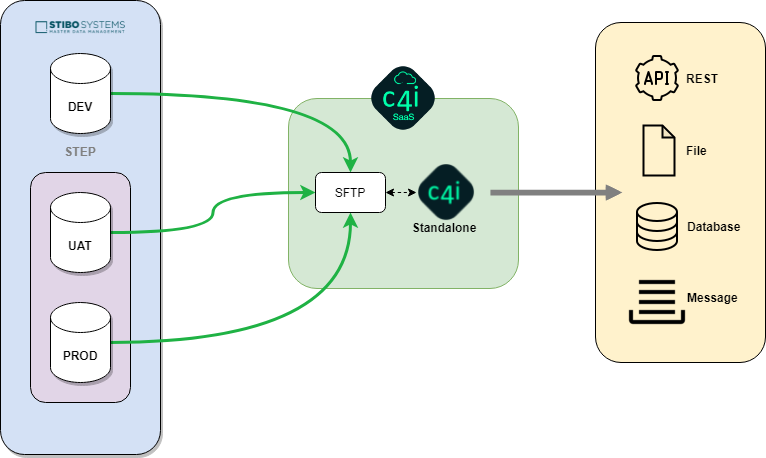
C4i SaaS schema

Cantor gives access to your c4i SaaS instance, configured according to the terms of your Companion for Integration licence contract.

From this application, multiple jobs can be configured with different connectors in order to transform and deliver your data upon your need.

A dedicated SFTP server is provided by c4i SaaS to allow STEP to push STEPXML files to feed your configured jobs. It is also possible to use your own private SFTP server, as long as it is accessible by c4i SaaS.

Which Companion for Integration connectors are supported

All Companion for Integration connectors are supported except Composite Connector that will be implemented in future release.

Find the complete list in the following section of the online documentation: Which connectors are currently implemented.

Last Updated: 9/19/24, 9:03 AM
Next
Managing jobs